

Claude Skills Hub
5


49 votes

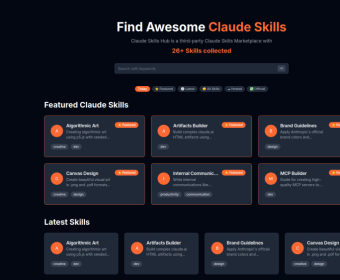
Claude Skills Hub is a curated, third‑party marketplace and directory dedicated to Claude Code skills—modular extensions that expand what Claude can do. Instead of starting from scratch for every workflow, users can browse a growing catalog of purpose-built skills that bundle specialized knowledge, tooling, and repeatable processes. The goal is simple: help you discover and add new capabilities to Claude quickly, whether you’re building developer utilities, generating polished documents, creating visual assets, or improving day‑to‑day communication.
The hub organizes skills by category (such as creative, development, design, productivity, communication, and office) and highlights Featured and Latest additions so you can keep up with new releases. Each skill is presented as a card you can open to view full details on GitHub, including documentation and installation instructions. Depending on the skill and your setup, installation is typically done through Claude Code or via Claude.ai, following the steps provided by the skill’s repository.
Claude Skills Hub also supports community contributions. If you’ve built a custom skill, you can submit it to be listed in the directory, helping others reuse your work and making the ecosystem more discoverable. An FAQ section addresses common questions like what skills are, how they work, where to find them, installation guidance, whether skills are free, the types available, and how submissions work. For additional assistance, users are directed to the site’s Contact Us page. more


Comments